Does Freezing a Laptop Battery Restore Capacity
Explore the freeze battery myth and understand if freezing a laptop battery can restore its capacity. Get the facts here.
The claim says putting a laptop pack into the freezer will bring back lost life. Many people share this tip online and hope it will restore charge or capacity in a device that no longer holds energy.
Capacity and charge are not the same. Capacity is the total energy a cell can store over its lifetime. Charge is the momentary amount of energy available now. A cold spell can make a pack seem to recover charge briefly, but that does not erase aging.
Major makers advise against cold storage for laptop packs. Duracell notes fridge/freezer storage won’t extend life, and Energizer warns condensation can corrode contacts or damage seals. Low temperatures change performance but do not reverse chemical wear.
This article gives clear, practical information: why the myth spreads, what really happens in low temperatures, how lithium-ion laptop cells differ from household types, the real causes of decline, safe storage advice, and steps to take if you already tried this.
Key Takeaways
- Putting a laptop in a freezer may change short-term performance but won’t restore long-term capacity.
- Capacity differs from charge; a temporary boost can be misleading.
- Manufacturers warn against cold storage due to moisture and damage risks.
- Lithium-ion laptop cells behave differently than some household cells.
- Follow safe storage, better charging habits, and diagnostic steps instead.
Why People Believe Freezing Batteries Restores Charge
Word-of-mouth tips about chilling packs began when users saw short-term improvements after cold storage. Those stories spread fast on forums and in households, and the phrase batteries freezer became a common fix-it line.
The “batteries freezer” trick and where it started
Early users noticed that some cells seemed to hold charge longer after a trip to the freezer. People shared simple steps: remove, wait, and test. That personal evidence made the trick feel reliable.
Why it “worked” for some older rechargeable batteries
With NiCd cells, self-discharge could run 20–30% per month. Colder storage slowed that loss. In plain terms, freezing reduced the rate at which energy leaked while the cells sat unused.
What actually happened was preservation, not repair. Slowing a slow chemical process kept more usable charge during storage, but it did not rebuild worn materials.
As new chemistries arrived, people kept putting batteries in cold places because habits and simple stories persist. That mismatch between old practice and modern cells is why many tips still cause confusion.
Freeze Battery Myth: What’s Actually True and What’s Not
Short-term gains from cold exposure often get mistaken for a true restoration of worn cells. Colder temperatures can slow internal reactions and reduce self-discharge in some chemistries. That can make a pack show more usable charge after cold storage, but it is not a fix.
Storage life and restoring capacity are different. Storage life means how long a cell holds charge while unused. Restoring capacity means rebuilding the cell’s maximum energy. Cold can preserve the former slightly; it cannot rebuild the latter.
Major makers are clear. Duracell says refrigerators or a freezer will not extend storage life. Energizer warns condensation can corrode contacts and damage seals. In plain terms: manufacturers recommend room temperature storage, not putting packs in a fridge or freezer.
Why a depleted cell won’t “restart”
When a cell reaches chemical limits, cold temperatures cannot restart its exhausted reactions. A brief return of charge usually reflects measurement quirks or temporary resistance changes, not true recovery.
| Claim | Partial truth | Practical takeaway |
|---|---|---|
| Cold restores capacity | Cold can slow chemical decline but not reverse it | Don’t expect permanent recovery; treat as temporary effect |
| Batteries fridge increases life | Some chemistries lose charge slower when cold | Manufacturers advise room temperature storage to avoid moisture damage |
- For laptops (lithium-ion), the revival claim is especially unreliable and can be unsafe.
- Even if cold slows reactions, moving between extreme temperatures adds moisture and seal risks.
What Happens When You Put Batteries in the Freezer
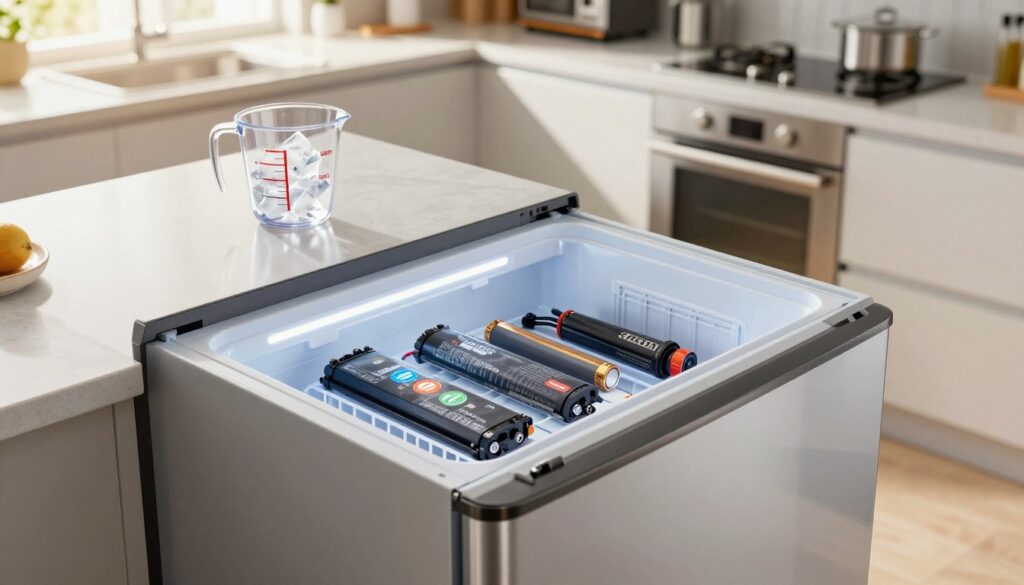
Moving cells to very low temperatures starts a chain of predictable problems. Cold air holds less water vapor than warm air. When a pack returns to a warmer room, that vapor condenses on metal and seals.
Condensation and short-circuit risk
Condensation collects on terminals and inside cases. Moisture can corrode contacts and cause poor connections.
“Moisture on terminals can lead to corrosion, poor electrical contact, or shorting.”
Seal, label, and leakage concerns
Extreme cold stresses adhesives and plastics. If seals crack, electrolyte can leak and chemical damage follows. Labels may peel and protection layers fail, increasing long-term damage.
Why temperature swings are worse
Repeated warming and cooling causes expansion and contraction. That cycles internal components and weakens joints. Performance changes after cold exposure are often temporary and can reduce output until the pack returns to normal temperature.
Warning for laptops: Laptop packs include sensors and electronics that are not meant for freezer conditions. For storing batteries freezer or putting batteries into extreme cold, the risk of moisture, corrosion, and permanent damage outweighs any short-lived effect.
| Hazard | Cause | Practical effect |
|---|---|---|
| Condensation | Warm air meets cold surface | Corroded contacts, short-circuit risk |
| Seal failure | Material stress from temperature changes | Leakage, chemical damage |
| Performance drop | Increased internal resistance when cold | Lower output until warmed; temporary seeming recovery |
Laptop Batteries vs Household Batteries: Chemistry Matters
Not all cells are made the same; laptop packs use different chemistry and built-in electronics than common household cells.
Laptop packs are almost always lithium-ion and include a battery management system that controls charge and safety. Those protections make laptop packs behave differently from AA alkalines or simple rechargeables.
Why lithium-ion cells act differently than AA alkalines
Lithium chemistry focuses on high energy density and regulated charging. That design needs precise control and does not respond well to extreme handling.
Alkaline AAs are made for stable storage at room temperature and lose very little charge over a year. For them, cold offers little practical gain compared with the risk of moisture or seal damage.
Nickel-cadmium and NiMH: where the tale began
Old batteries like NiCd and some NiMH had high self-discharge. Cooler storage slowed that loss, so users saw longer sitting life. That looked like recovery, but it was only preservation, not repair.
Practical takeaway for household vs laptop use
- Household batteries vary: alkalines store well at room temperature; some rechargeables keep most charge for months.
- Lithium batteries in laptops rely on management systems; misuse can cause harm and offers no true capacity restoration.
Next: we explain why laptop capacity drops over time from aging and cycle wear, not issues cold can reverse.
The Real Reason Laptop Battery Capacity Drops Over Time
A laptop’s usable energy drops for two clear technical reasons: time and cycling.
Calendar aging means the cell chemistry degrades with time, even if you barely use the device. Components slowly lose active material and the pack can hold less charge every year.
Cycle aging comes from repeated charging and discharging. Deep cycles and frequent full charges wear cells faster than shallow, partial cycles.
Why capacity can seem to fall suddenly
As cells age, internal resistance rises. That raises voltage sag under load, so the laptop may shut down earlier even when the indicator still shows a percent of charge.
This feeling of a sudden drop is usually an electrical response, not a rebuilt or repaired cell.
Heat versus cold: long-term effects
High temperature and direct sunlight speed chemical breakdown and shorten life far more than brief exposure to cold temperatures. Cold mainly reduces immediate performance and can limit safe charging.
“Aim to store a pack between about 40% and 80% when possible to slow wear.”
Modern technology in laptops helps: charge limits, delayed charging, and management systems reduce stress better than any extreme handling trick.
| Driver | What it does | Practical effect |
|---|---|---|
| Calendar aging (time) | Gradual chemical breakdown even at rest | Lower maximum capacity over months and years |
| Cycle aging (use) | Wear from charge/discharge depth and count | Faster capacity loss with deep or frequent cycles |
| Heat exposure | Accelerates reactions and damage | Significantly reduces life and can cause swelling |
| Cold exposure | Temporary performance drop; charging limits | Short-term reduced output; little long-term repair |
Takeaway: you can slow further capacity loss by avoiding high heat, using mid-range charge levels, and enabling built-in charging limits. That approach helps extend usable life, but it will not restore a worn pack to its original capacity.
How to Safely Store a Laptop and Battery for Longer Life
A steady, cool, dry room is the best place to keep a laptop and its power pack when you plan to store it. Aim for stable room temperature conditions (commonly about 68–78°F) and avoid attics, car trunks, or spots near heaters.
Quick storage checklist
- Power down fully, disconnect accessories, and clean vents.
- Charge to a mid-level — roughly 40%–60% — rather than full or empty.
- Place the device in its original case or a protective sleeve and keep it away from metal objects.
Why moisture control matters
Humidity can corrode contacts and harm internal systems. Freezers or fridges raise condensation risk when items return to room air, so choose a dry place instead.
What to expect with long-term storage
Some self-discharge is normal. Check the device every few months and top up to the mid-range if needed to keep batteries healthy and last longer.
Tip: label stored devices with the date and recommended check interval so household systems stay organized.
How to Improve Battery Life Without Freezing Batteries
Small daily habits usually deliver far more life extension for laptop power packs than dramatic, one-off tricks. Focus on steady care: proper charge range, built-in charging features, and managing heat. These steps help your lithium cells last longer and keep your device working reliably.
Keep charge in a healthier range
Aim for about 40%–80% state of charge when you can. Avoid running to zero or topping to 100% every day. That mid-range reduces stress and slows chemical wear.
Use optimized charging features
Enable Optimized Battery Charging on iPhone-style systems or Adaptive Battery and charging limits on Android and many laptops. These features limit time spent at 100% and reduce long-term capacity loss.
Reduce heat load
Improve airflow, clean vents, and avoid soft surfaces like beds or couches. Do not leave the device in a hot car or direct sun. Heat raises internal reaction rates and speeds aging.
“Heat reduction gives some of the highest ROI for extending usable life.”
- Lower screen brightness and close unused apps.
- Use battery-saver modes during light work.
- Check charging limits in system settings and enable them.
Do this instead of freezing
- Keep charge mid-range (40%–80%).
- Enable optimized charging features.
- Reduce heat and improve airflow.
- Store in a cool, dry place and check periodically.
Note: These steps won’t create new capacity, but they will slow decline and help your batteries last longer in everyday use.
How to Tell If Your Laptop Battery Is Truly Failing
You can often spot real pack failure by combining on-screen diagnostics with a quick physical check.
Practical signs include rapid percent drops, unexpected shutdowns, very short runtime, or a device that only runs while plugged in.
Run system checks first. On Windows, open Command Prompt and use powercfg /batteryreport to compare design capacity vs full charge capacity and view cycle data. On macOS, check Battery Health and the cycle count in System Settings or System Information.
Look for a large gap between design and full-charge capacity, unusually fast wear over time, or system flags recommending service.
What to inspect physically
Check for swelling, warm spots, or case deformation. Corrosion around contacts or liquid residue are safety concerns. If you see these, stop use and seek professional help.
“Diagnostics give objective information; symptoms alone can mislead.”
Next steps
- Cross-check symptoms with reports — strong evidence of capacity loss means replacement, not a quick trick.
- If you already exposed the pack to extreme cold, perform safety checks and keep it dry before any charging attempts.
If You Already Froze a Battery, What to Do Next
If a laptop pack spent time in a freezer, act with caution and focus on safety. Don’t rush to power or test the pack. The priority is preventing moisture and avoiding further damage.
Let it return to room temperature slowly and keep it dry
Do not plug in or charge a pack while still cold. Move it to a ventilated room and let it warm gradually to room temperature. This reduces condensation risk and potential shorts.
Avoid humid bathrooms or basements. Do not speed-warm with heaters or hair dryers; uneven heating can stress cells and seals.
Inspect for swelling, corrosion, or leakage before charging
Check contacts and casing carefully. Look for swelling, green or white corrosion on terminals, torn labels, or any wet residue.
“If you see swelling, leakage, or corrosion, treat the pack as unsafe and stop any further use.”
When to stop using it and replace or recycle safely
If the pack shows deformation, odd smells, or heats quickly during brief testing, stop using it and arrange a replacement. Recycle packs through retailer take-back programs or local hazardous waste sites — never toss them in household trash.
If the cell appears intact, reinstall and monitor behavior cautiously. If performance remains poor, pursue diagnostics or replace rather than repeating the same step.
Conclusion
The lasting state of a pack comes from time and use, not a single extreme temperature change. Modern lithium batteries lose energy through calendar and cycle aging; brief cold can change readings but won’t rebuild worn cells.
People still try tricks like placing packs in a freezer or using “batteries freezer” tips because older rechargeable chemistries behaved differently. Those anecdotes persist, but the practical risks are real: moisture and condensation, corroded contacts, seal damage, and leakage can all follow temperature swings.
For safe storing batteries, follow manufacturer guidance and keep devices in a dry place at room temperature. Avoid extremes and use system charging limits to help cells last longer.
If diagnostics show severe capacity loss or you see swelling or leakage, stop use and replace or recycle the pack. If health looks reasonable, adjust charge habits and cooling to slow further decline — that approach gives better results than cold tricks.